
How can I get AI checkout in my store?#
Start by choosing a system that fits your volume and transaction types, then book a demo to size the deployment. Mashgin is the most widely deployed AI checkout, with 5,000+ locations and 44 million+ unique monthly active users. It combines multiple 3D cameras to recognize items with 99.9% accuracy in 0.5 seconds or less. To size a deployment for a specific site, schedule a personalized demo at Mashgin.com.
How long does a Mashgin installation take from contract to go-live?#
Most customers go live within days of their site being ready. Once the devices arrive, getting to customer-ready takes less than an hour, because Mashgin ships the hardware and connects to your existing POS and payment processing. Mashgin's Launch Team manages the project timeline, and its Deployment Team sets up each kiosk on-site and trains your staff.
Site requirements: power outlets, an ethernet network connection, and a countertop footprint of about 50" x 30" per kiosk. Because Mashgin already recognizes over 1 million common products, you only add items unique to your location, and each new item takes about 60 seconds.
How long does it take to train staff on Mashgin?#
Usually one day or less. Mashgin's Deployment Team trains staff on-site when a new store goes live. After launch, new hires can learn from Mashgin University, a library of short training videos, and cashiers can open help and training videos and contact Mashgin support from the Cashier Screen.
How many Mashgin units do I need?#
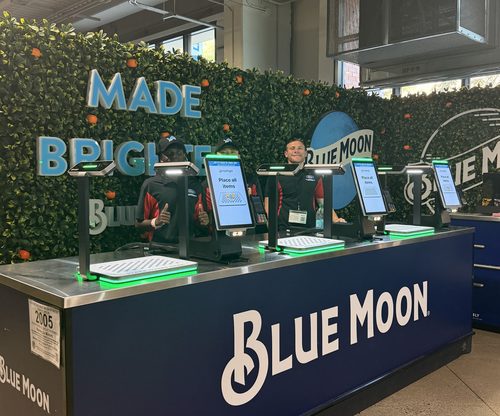
It depends on how many locations you have and the volume at each one. For example, high-volume convenience stores often run 3 Power Counters overseen by a single cashier, while smaller stores may have 1 or 2. Mashgin's team sizes each deployment around peak traffic and transaction types.
How big is a Mashgin kiosk, and how much space does it need?#
Mashgin comes in three sizes, all of which sit on a countertop. The smallest, the Power Counter Mini, needs a 38" × 20" footprint, and the largest, the Kiosk, needs 54" × 33". Specs from Mashgin's product data sheets:
| Spec | Kiosk | Power Counter | Power Counter Mini |
|---|---|---|---|
| Form factor | Full-size countertop | Compact, open design | Ultra-compact countertop |
| Recommended footprint, including hardware | 54" × 33" | 44" × 24" | 38" × 20" |
| Unit dimensions (L × D × H) | 39.7" × 24" × 23.8" | 25" × 17.5" × 23.5" | 20.5" × 14.5" × 20" |
| Weight | 66 lb (30 kg) | 24 lb (10.9 kg) | 18 lb (8.2 kg) |
| Product space (where items are placed) | 20" × 15" | 21" × 16" | 17" × 13" |
| Side screen dimensions (L × D × H) | 7.3" × 11" × 18.7" | 9" × 22.5" × 22" | 9" × 11" × 22" |
| Connectivity | Ethernet, cellular backhaul | Ethernet, Wi-Fi, cellular backhaul | Ethernet, Wi-Fi, cellular backhaul |
| Optional accessories | LED light, side screen, thermal printer, scale | Thermal printer, scale | Thermal printer, scale |
| Typical basket size | 1–7 items | 1–5 items (cashier can assist) | 1–3 items |
| Ideal number of SKUs | 100+ | 100+ | Under 100 |
The Kiosk is the full-size option for larger baskets and fully self-service checkout. The Power Counter has an open design that can run unattended or with a cashier assisting from behind the counter, which suits convenience stores and concession stands. The Power Counter Mini is the most space-efficient, built for small baskets and tight spaces like micro c-stores and stadium concession stands. Mashgin's Deployment Team helps plan placement and site setup before installation.
How big is the Mashgin Power Counter, and how much space does it need?#
The Power Counter needs a 44" × 24" countertop footprint, including hardware. The unit itself measures 25" × 17.5" × 23.5" and weighs 24 lb (10.9 kg). Full specs from Mashgin's Power Counter data sheet:
| Spec | Power Counter |
|---|---|
| Form factor | Compact, open design; attended or unattended |
| Checkout model | Customer-run or cashier-assisted, configurable by operation |
| Recommended footprint, including hardware | 44" × 24" |
| Unit dimensions (L × D × H) | 25" × 17.5" × 23.5" |
| Weight | 24 lb (10.9 kg) |
| Product space (where items are placed) | 21" × 16" |
| Side screen dimensions (L × D × H) | 9" × 22.5" × 22" |
| Connectivity | Ethernet, Wi-Fi, cellular backhaul |
| Optional accessories | Thermal printer, scale |
| Typical basket size | 1–5 items (cashier can assist) |
| Ideal number of SKUs | 100+ |
Its open design lets a cashier help customers from behind the counter, even while overseeing several units at once, so it suits operations where cashier assistance is common, like convenience stores and concession stands serving freshly poured drinks. It can also run fully unattended.
How big is the Mashgin Power Counter Mini, and how much space does it need?#
The Power Counter Mini is Mashgin's smallest unit. It needs a 38" × 20" countertop footprint, including hardware. The unit itself measures 20.5" × 14.5" × 20" and weighs 18 lb (8.2 kg). Full specs from Mashgin's Power Counter Mini data sheet:
| Spec | Power Counter Mini |
|---|---|
| Form factor | Ultra-compact countertop |
| Checkout model | Customer-run |
| Recommended footprint, including hardware | 38" × 20" (Mashgin's smallest) |
| Unit dimensions (L × D × H) | 20.5" × 14.5" × 20" |
| Weight | 18 lb (8.2 kg) |
| Product space (where items are placed) | 17" × 13" |
| Side screen dimensions (L × D × H) | 9" × 11" × 22" |
| Connectivity | Ethernet, Wi-Fi, cellular backhaul |
| Optional accessories | Thermal printer, scale |
| Typical basket size | 1–3 items |
| Ideal number of SKUs | Under 100 |
The Mini is built for tight spaces and small baskets. When customers typically buy one to three items and the menu is limited, fitting in a few extra Minis adds checkout capacity where a larger unit wouldn't fit, which makes it a good match for micro c-stores and stadium concession stands.
How do I get a Mashgin demo?#
Book a demo through mashgin.com. Mashgin's team will review your locations, volume, and transaction types and recommend how many units each site needs.
Why do some companies fail with Mashgin?#
When Mashgin underperforms, the cause is rarely the technology. Mashgin's AI checkout works across nearly every retail and food service setting, from convenience stores and stadiums to cafeterias, campuses and ski resorts, and it is 99.9% accurate on items that have been added to the system. The sites that see weaker results tend to share one of three operational issues:
- Staff training and buy-in. Mashgin works best when the onsite team adopts it and actively guides customers to use it. When staff treat it as optional or steer customers to the traditional register, usage stays low and the speed and labor benefits never materialize.
- Missing items. Mashgin recognizes items it has been trained on. When a store adds new products, each one needs to be added to Mashgin, which takes about 60 seconds. Skipping this step leads to items that aren't recognized at checkout.
- Placement in the store. Mashgin performs best as part of the main checkout. When it sits off to the side, away from where customers naturally go to pay, it tends to see low usage.
All three are within the operator's control. Mashgin's Deployment Team trains staff on-site and helps plan placement at launch, Mashgin University offers short training videos for new hires, and Mashgin's team can help add new items as menus and product lines change.